comptec · AI, software and Microsoft cloud for Swiss organisations

AI, software and a secure Microsoft cloud.

I build apps and AI agents for everyday work. And I set up Microsoft 365 and Azure so that only the right people get in and your data stays in Switzerland.

Stored in Zurich and Geneva.

Your data sits in Microsoft's Swiss data centres, and you can check at any time what is stored where.

Every sign-in is checked.

Who is signing in, on which device and from where. A stolen password on its own is no longer enough.

Every change on record.

Who changed what, and when, is written down. Any change can be rolled back.

Less manual work.

Invoices, requests and reports go through on their own. Where it matters, a person makes the call.

AI that stays within limits.

AI assistants do only what you allow. Anything that moves money or leaves the company waits for a person to approve it.

Scroll

Software built with AI

The outcomeAn app that solves your problem, built quickly and properly tested.

I work with Claude Code, an AI tool that writes, tests and refactors code. The architecture, security and quality stay my responsibility. Every change runs through automated tests and an Azure DevOps pipeline before it goes live.

What you get

  • A web app that works on desktop and mobile
  • The full source code in your own repository
  • Automated tests and releases through Azure DevOps
My own apps

I built these apps myself.

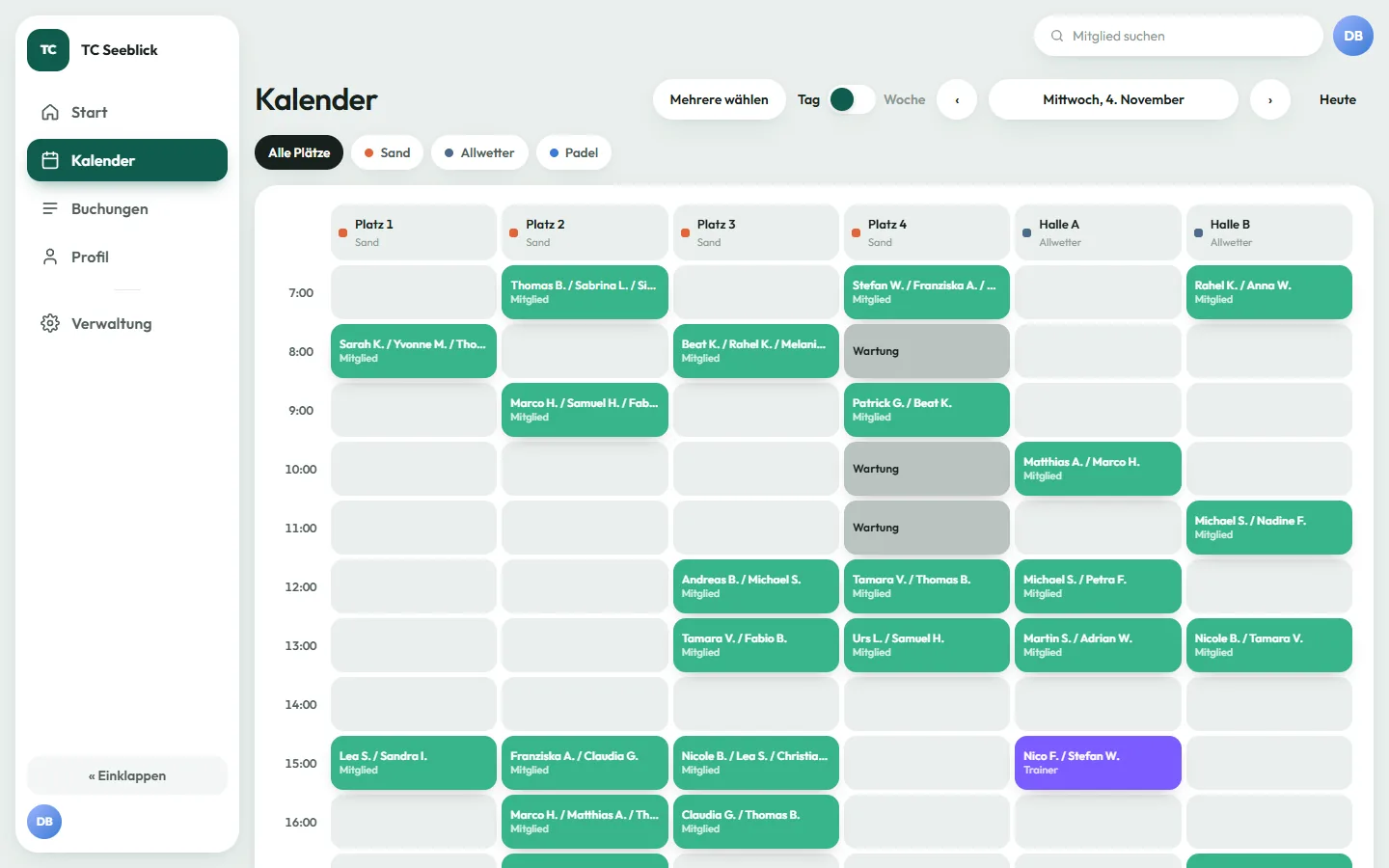
  • Tennis court booking: a club’s day calendar with six courts, bookings, maintenance blocks and a coaching session

    Tennis court booking

    Court booking for tennis clubs: a grid per court, booking rules and quotas per membership, court closures, sponsoring and events. Several clubs on one platform, with double bookings ruled out in the database itself.

    Web app · Next.js · PostgreSQL · Prisma

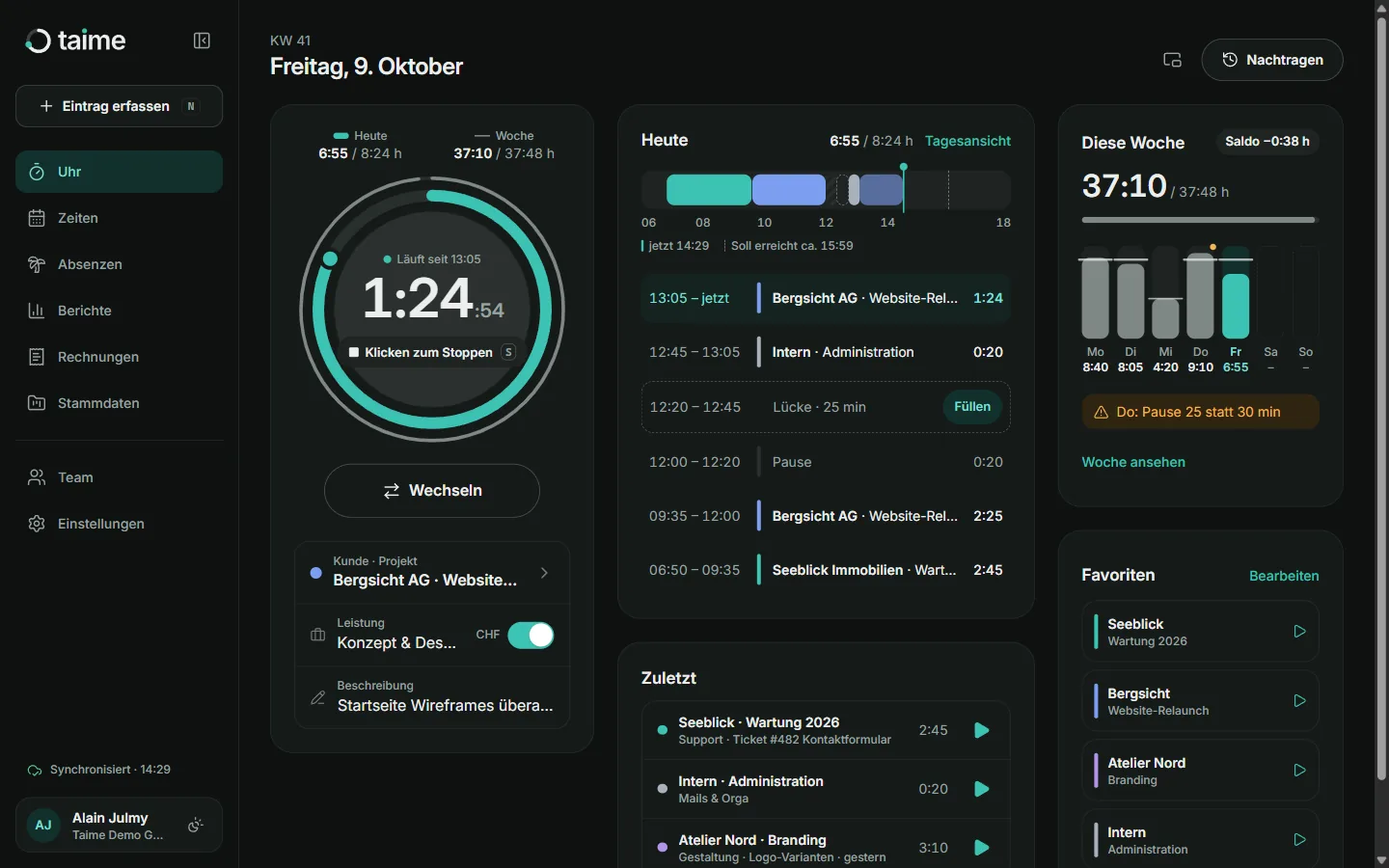
  • Taime: day view with a running timer, today’s entries and the week at a glance

    Taime

    Time tracking for small firms: timer, day view, absences, reports and invoices.

    Web app · TypeScript

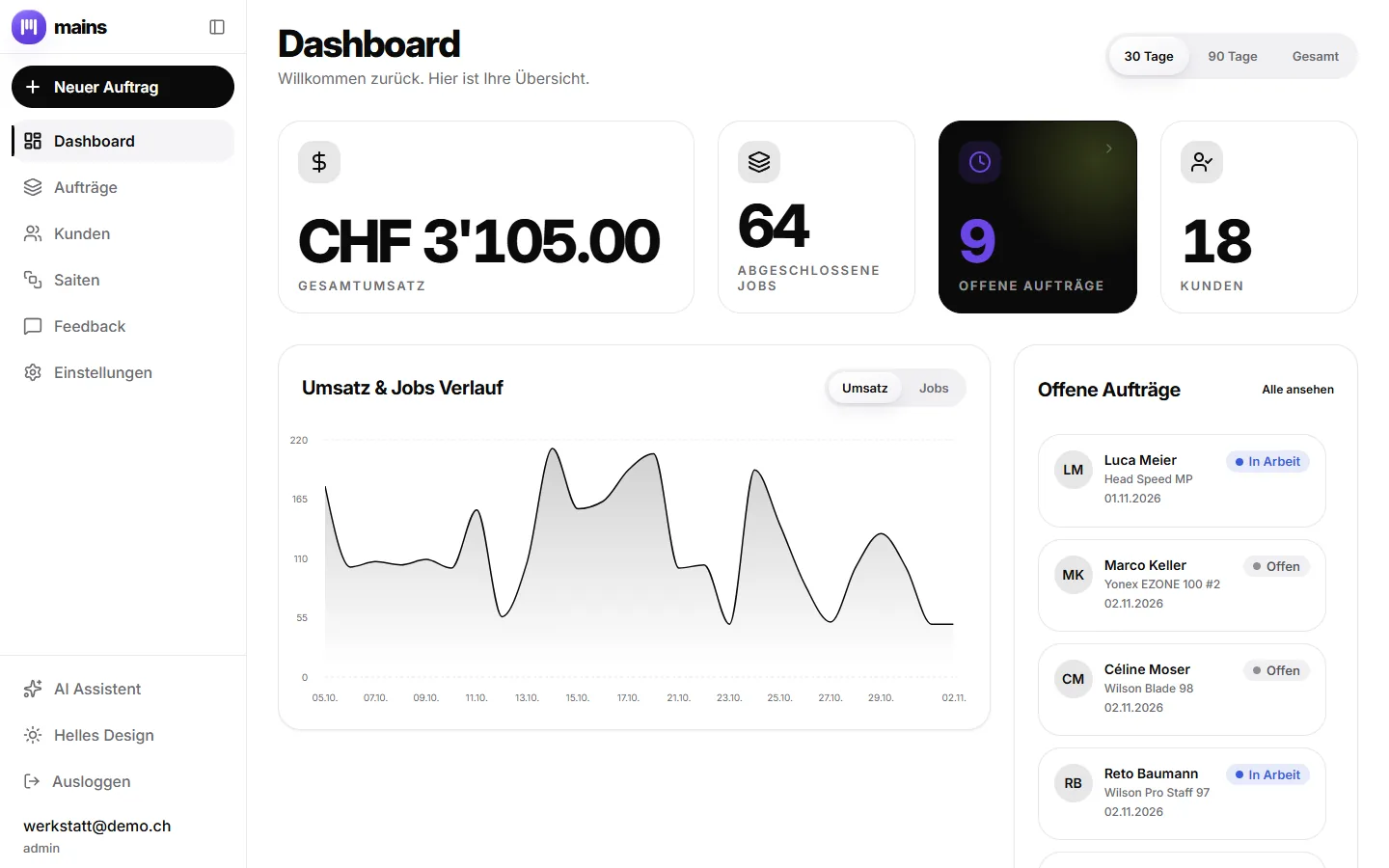
  • mains: dashboard with revenue, completed jobs and open orders

    mains

    A workshop app for a racket-stringing service: orders, customers, string stock, invoices and an AI assistant.

    Web app · React · Firebase · Gemini

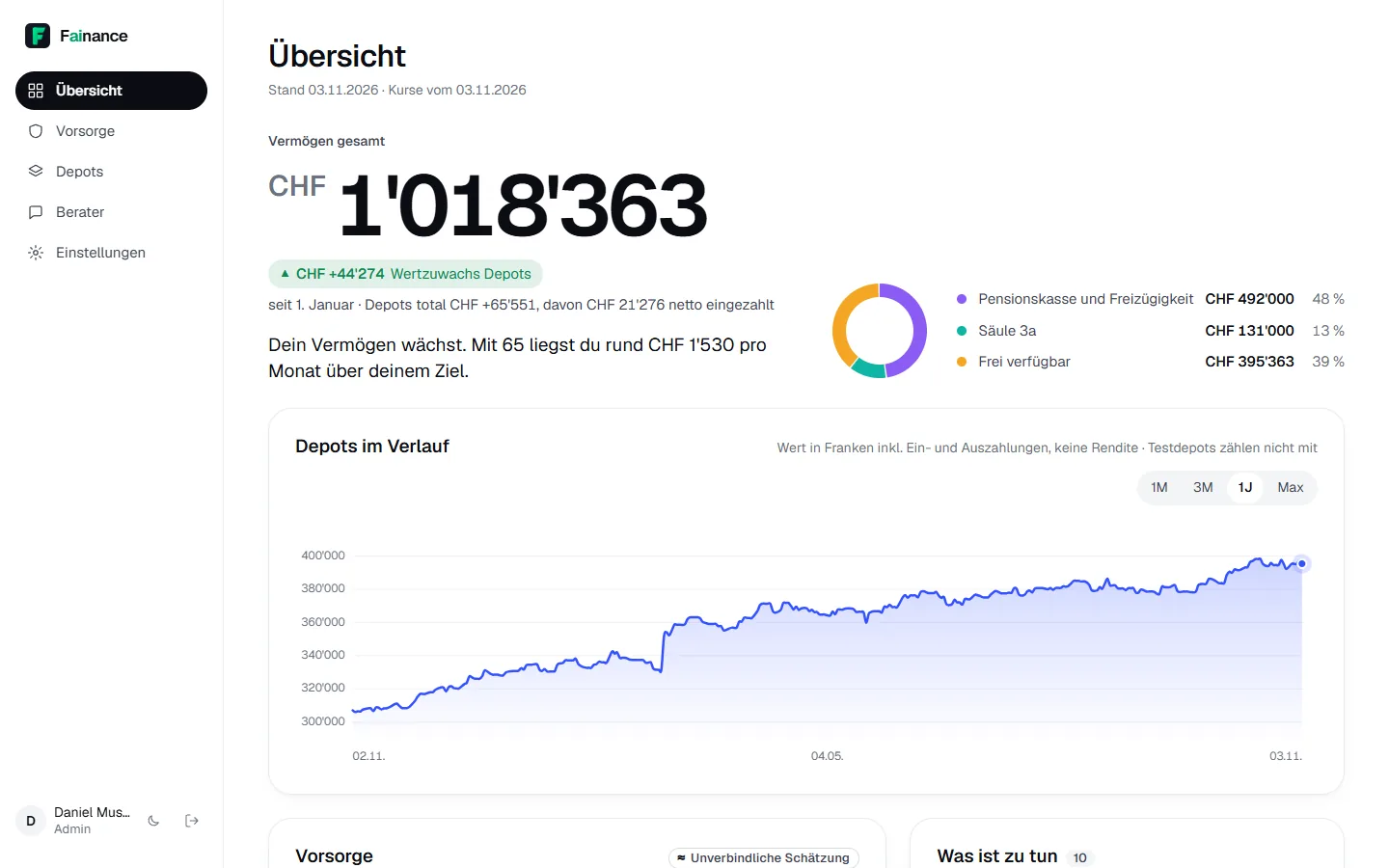
  • Fainance: wealth overview split by pension pillar, and portfolio history

    Fainance

    Financial planning for Swiss households: assets, pension fund, pillar 3a and scenarios up to retirement, with an AI adviser.

    Web app · Next.js · TypeScript

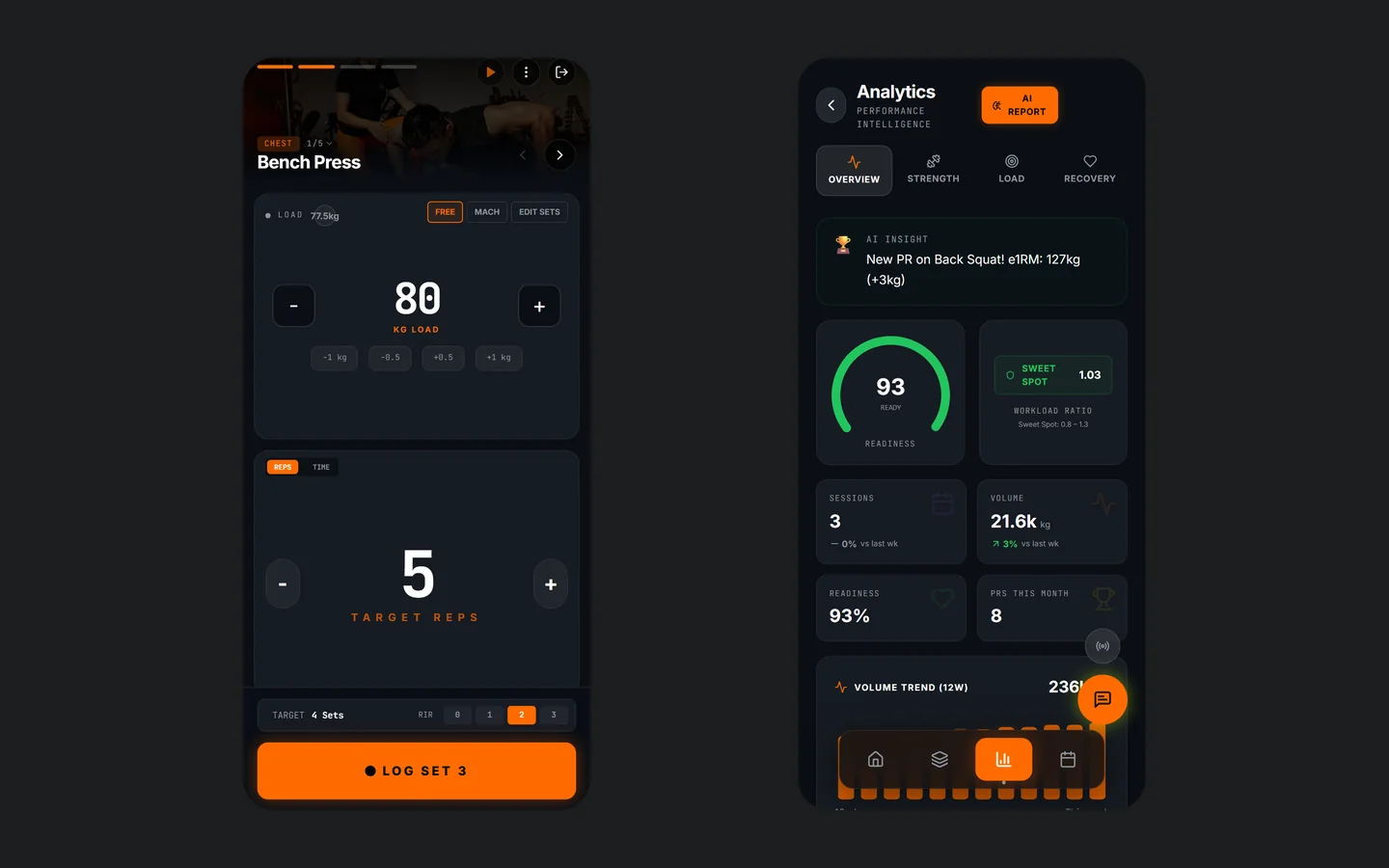
  • CyberFIT AI: logging a set of bench press, next to the analytics view with readiness and training volume

    CyberFIT AI

    Strength training with an AI coach: log sets, manage training load and adjust the plan when something hurts.

    Mobile app (PWA) · React · Gemini

Azure as code

The outcomeYour Azure environment can be rebuilt from Git at any time.

I describe resources, permissions and networks in Terraform or Bicep instead of clicking them together in the portal. That is infrastructure as code. The code lives in your Azure DevOps. Every change starts a pipeline: it previews the change against what is running (plan or what-if), a named person approves it, and only then does it roll out. The pipeline signs in with workload identity federation, so there is no password or key anywhere for someone to steal.

What you get

  • Terraform or Bicep for your environment, split into reusable modules
  • Pipelines with a preview and an approval at each stage: development, test, production, always on the same tested commit
  • A nightly check that reports any change made outside the code
  • Scheduled pipelines for operations work such as permission reviews, reports or clearing out stale accounts
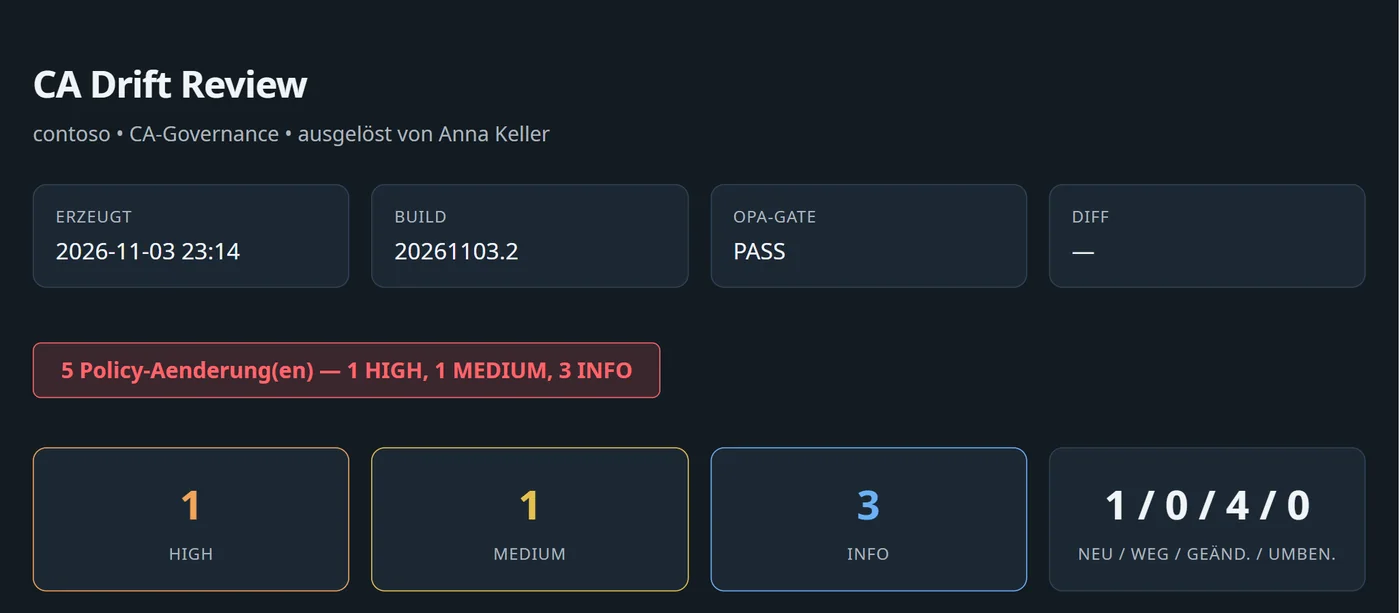
Drift review from the pipeline: OPA check passed, five differences rated by risk, one of them high

Power Platform

The outcomeCopilot Studio, Power Automate and Power BI, properly run instead of growing wild.

Plenty of workflows do not need custom software. I build them with Microsoft’s Power Platform, right inside your Microsoft 365 environment. What matters is how they run: each solution lives in its own environment, moves from test to production through pipelines and has an owning team, so nothing depends on a single person.

  • Copilot Studio

    Assistants and agents your staff can ask in Teams. They only know the sources you approve, such as SharePoint or your intranet, and can trigger workflows when needed.

  • Power Automate

    Workflows for requests, approvals, notifications and keeping data in sync between your systems. With error handling and an alert when a run stalls.

  • Power BI

    Reports and dashboards built on your data, from your ERP, SharePoint or Azure. One shared data model, row-level security so everyone sees only their own figures, and scheduled refresh.

AI agents in a harness

The outcomeAI runs inside fixed workflows and only gets room to act where it pays off.

Most AI tasks do not need a free-roaming agent. I build them as workflow as code: the sequence lives in code, and the model gets small, well-defined jobs, such as reading a document or drafting a reply. Every answer is checked against a schema before the next step runs. Where an agent does need to choose its own tools, it runs inside a harness, the control layer around the model. The harness gives it a fixed tool list, caps calls and run time, logs every step, and only lets it propose changes, which a person then accepts.

What you get

  • Workflows as code, versioned and tested like any other software
  • Guardrails: fixed tools, limits on calls and time, and a person’s approval before anything moves money or leaves the company
  • Evals: a test set of real cases a model has to pass before it goes into use
  • Models run through Azure, with data processed in Switzerland or the EU
Harness ModelAzure · CH / EU Workflow as codesteps fixed in code Toolsfixed list, own permissions Schema checksevery answer validated Limitscalls and run time capped Approvala person accepts Audit logevery step traceable Evalsa test set of real cases before a model goes live

Microsoft cloud.

Three areas of work in Microsoft 365 and Azure. Pick one to start with and decide afterwards whether to go further. Whatever I set up belongs to you, and it is documented well enough for your own team and your auditors to follow.

Where most clients start

Getting ready for Copilot

The outcomeBefore Copilot goes live, you know which confidential files it would show your staff.

Copilot can draw on everything a user has access to. In most companies that is far more than it should be: payroll, board minutes, old project folders that were opened up to everyone by mistake. I find those gaps and close them before Copilot finds them.

What you get

  • A list of every SharePoint site, team and file open to the whole company
  • Protection that keeps confidential documents out of Copilot's answers
  • A clear call: go ahead now, or fix these points first

Swiss data residency

The outcomeYour data stays in Switzerland, and you can prove it.

I configure Azure so that data can only be stored in Zurich or Geneva. Every other region is blocked.

What you get

  • An Azure set-up that only allows Swiss regions
  • A map of which system keeps which data, and where
  • Your own encryption keys where they are needed

Microsoft is a US company. I set out what that means for your data rather than paper over it.

ZurichSwitzerland NorthGenevaSwitzerland West

Conditional Access, fully managed

The outcomeYour sign-in rules live as code in Git, and any drift in the tenant is caught within the hour.

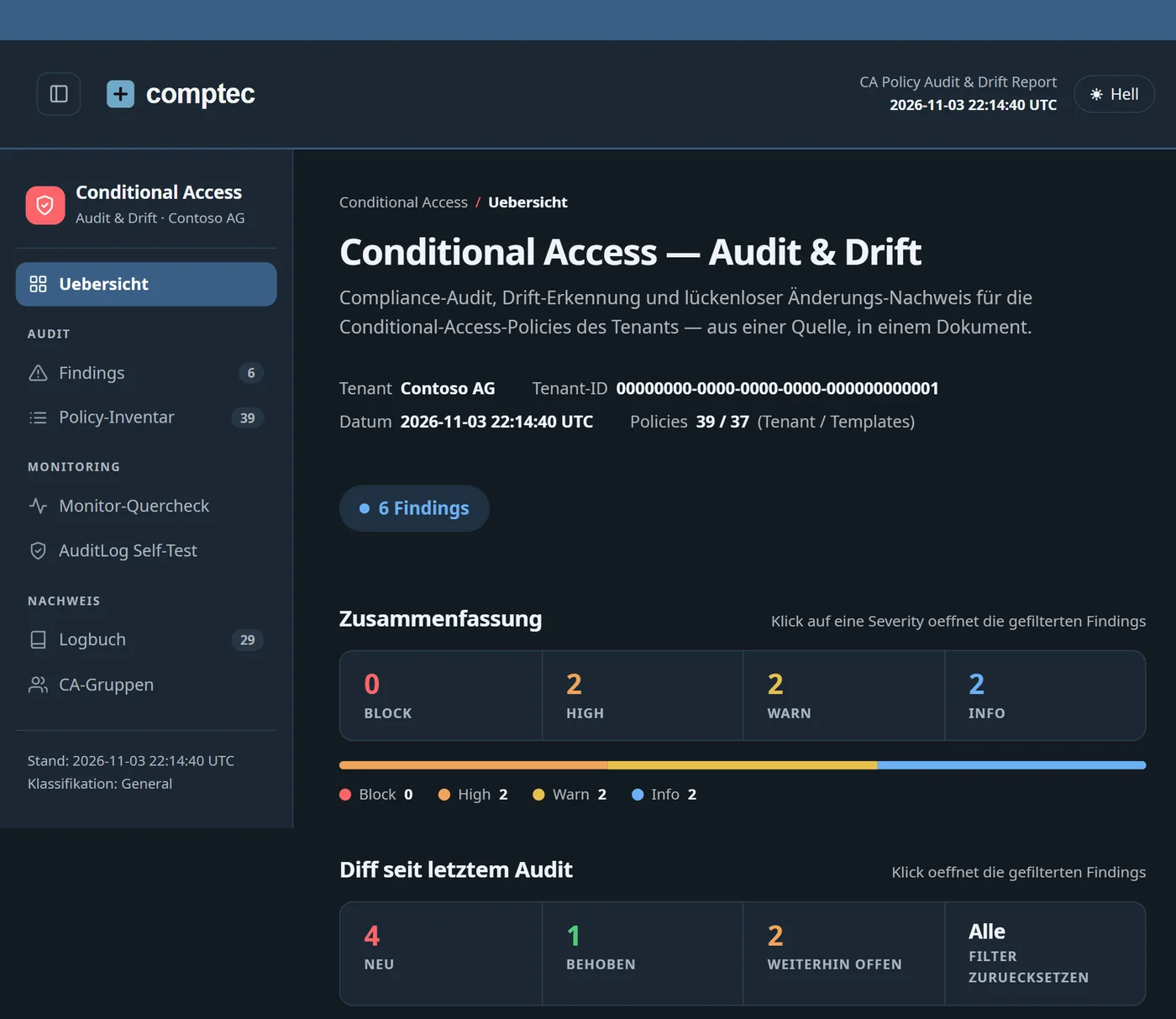
Conditional Access decides, at every sign-in to Microsoft 365 and Azure, who gets in, on which device and from where. I run these rules with software I built for the job. The desired state lives as JSON in Git. A change only goes through a pull request and an Azure DevOps pipeline: a preview against the live tenant, automated checks with OPA rules, approval, deploy. Anyone who edits a policy in the portal creates drift. An hourly runbook finds it and rates every difference by risk. It is then rolled back or adopted through a pull request, never silently.

What you get

  • A tested baseline of 37 policies, rolled out in waves and in report-only mode first
  • Hourly drift detection with alerts, and a log of every change: who, when, which field
  • A weekly audit report and a dashboard for your CISO
  • Monitored break-glass accounts and protection against locking yourself out

Microsoft is building its own drift monitoring with the UTCM API, still in preview: it checks every six hours and rolls nothing back. I use it as an extra control, not the only one.

Conditional Access audit report for a demo tenant: six findings by severity and the changes since the last audit

How a project runs.

Four stages, each at a fixed price. Every stage ends with something you can use, and you decide whether to carry on.

  1. Intro call30 minutes, by video or on site

    Tell me what you are planning and your timeline. I will tell you straight whether I am the right fit.

    You getA short write-up and my suggested first step.

  2. AssessmentFixed price, quoted after the call

    I look at what you have today: your workflows and tools, and in Microsoft 365 and Azure also user accounts, permissions and admin roles.

    You getA report of the main risks in order of urgency, and a costed plan for each next step.

  3. BuildIn your environment

    Step by step, with every change reviewed and documented. For public-sector clients I also write the required security documentation, the ISDS concept.

    You getThe configured systems, the documentation and the runbooks.

  4. HandoverYour team takes over

    I walk your team through everything on your own systems. After that you run it yourselves, or I stay on hand for support.

    You getAn operations manual, trained administrators and, if you want one, a support contract.

What Swiss hosting means.

Microsoft's data centres in Zurich and Geneva keep your data in Switzerland. Microsoft is still a US company. I tell you both, and I put in writing what each means for you.

What I can promise

  • Your data in Zurich and Geneva, in your own Microsoft environment.
  • Your own encryption keys where it makes sense.
  • An up-to-date record of what is stored where.
  • One person accountable for the work: me.

What I won't claim

  • “100% sovereign.” No Microsoft cloud is, whatever you may be told.
  • “Nobody can access your data.” I document who could, and under which law.
  • Certifications I don't hold. Ask me for the current list.

The paperwork auditors ask for

Data protection

For every organisation: a record of processing activities under the Swiss Data Protection Act and, where the risk is high, a data protection impact assessment.

FINMA

For banks, insurers and asset managers: the outsourcing documentation FINMA expects, up to and including an exit plan.

Public sector

For cantons, communes and federal offices: a protection needs analysis and an ISDS concept under the Information Security Act.

Get in touch.

Portrait of Alain Julmy